


What is it?
The XCC Radar Customizer can be used to change the contrast/brightness of the in-game minimap, this can help make units easier to see. It can be used with TS, RA2 and YR.
How to use it:
Have the game(s) closed and download XRC.zip, open it and launch the XCC Radar Customizer.
A window with various check boxes will appear. These are used to enter your input values and select your preferred games. Choose your settings and click "ok", the customizer will load briefly. Close the Customizer and restart the selected game(s), the radar will now use the new minimap settings.
How the scale works:
Lower settings will darken the terrain on the minimap. This will cause game units to appear more brightly, but will reduce the visibility of the terrain.
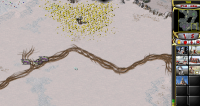
Higher settings brighten the terrain, but as a result, game units are harder to see.
Some examples:
50 50 50 (Low)
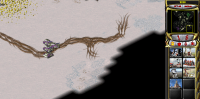
128 128 128 (Default)
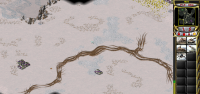
255 255 255 (High)
Customizer Interface
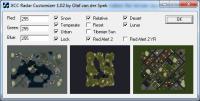
You can deselect "Lock" and change the brightness of individual colours; this is similar to shifting the "tint" setting on basic image editors.

XCC Radar Customizer
Started by rumblesom, Apr 11 2015 03:59 PM
1 reply to this topic
#1

Posted 11 April 2015 - 03:59 PM

0 user(s) are reading this topic
0 members, 0 guests, 0 anonymous users

