

Hey!
I just installed the downloadable version of Ra2 on 64bit Windows 7. I am able to play skirmish, but whenever I log on and attempt to play an online game, I'll get an internal error.
Thanks in advance.

Internal Error with Red Alert 2 [Expired]
Started by Tobi, Aug 08 2012 08:10 PM
28 replies to this topic
#2

diZZ0e
-

- Members
-

- 1 posts
New Conscript
Posted 08 August 2012 - 09:47 PM
Yeah I'm getting the same thing. I login for custom match and there's no one visible. Quick match, I get a server not found error... :\
#3
Posted 10 August 2012 - 12:50 PM
Actually that's not the issue in my case.
I'm allowed to hop to the lobby as well as I'm able to join games, but when I am connecting to other players the internal error appears.
Help, anyone?
I'm allowed to hop to the lobby as well as I'm able to join games, but when I am connecting to other players the internal error appears.
Help, anyone?
Edited by Tobi, 10 August 2012 - 12:51 PM.
#4

Posted 10 August 2012 - 01:33 PM
hi,
did u install the game from original cd or did u downloaded the game here http://xwis.net/forums/index.php/files/file/8-red-alert-2-download/(with out cd needed) from xwis/strike-team?
did u install the game from original cd or did u downloaded the game here http://xwis.net/forums/index.php/files/file/8-red-alert-2-download/(with out cd needed) from xwis/strike-team?
Edited by a1Who, 10 August 2012 - 01:34 PM.
#5

Posted 10 August 2012 - 01:56 PM
Hey!
Hey!
You got what you deserved after losing this game!
Dude.
Let's rebuilt -EF- , i got a plan.
Take that password of -ef- withyou aswell former clanleader!!
Promise you will do it then i''l help you on this one right?
#6
Posted 10 August 2012 - 03:13 PM
hi,
did u install the game from original cd or did u downloaded the game here http://xwis.net/forums/index.php/files/file/8-red-alert-2-download/(with out cd needed) from xwis/strike-team?
I just downloaded it, although I have the CD.
Hey!
You got what you deserved after losing this game!
Dude.
Let's rebuilt -EF- , i got a plan.
Take that password of -ef- withyou aswell former clanleader!!
Promise you will do it then i''l help you on this one right?
We'll see it mate.
 Looking forward to play some games!

#8
Posted 10 August 2012 - 05:43 PM
I just downloaded it, although I have the CD.
We'll see it mate.
Hahaaaaaaaaaaaaaaaaa!
Dude. I mean Tobberi!!!!
You got that -EF- pass m8?
If no beg it from Alex he does not want to give me. I know why you do also get it and become ef leader again do it for the future!!

#10
Posted 11 August 2012 - 12:09 PM
can u make a screenshot when the error pops up and what it says?I just updated my Lan drivers, however, the same devastating internal error shows up over and over again.
Any other advices to fix this?

#12
Posted 11 August 2012 - 04:52 PM
when u go to quick match the same happens? u speak german? look ur inbox
Installing and Playing Red Alert 2 on Windows 7
Step 1 Download. You can download Red Alert 2 entirely free. Click here to download.
Step 2 Installing. Once you have downloaded Red Alert 2, run the .exe file 'Red_Alert-2-0.0.0.exe' and follow through the installer.
Step 3 Program Files. At default, Red Alert 2 is installed to Program files in a folder called 'Red Alert 2'. Open up the Red Alert 2 Folder.
Step 4 Inside the Red Alert 2 Folder. Locate Red Alert 2.exe (With a Soviet icon) and right click the application and select properties. You are now given a 'Game Properties' window. Tick the following boxes as shown in the Attached Screenshot. (Run this program as Windows XP SP3, Run this program as an Administrator). Once you have those settings matched, Click Apply and OK.
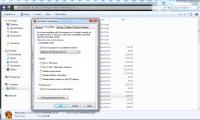
Step 5 Download and Install the latest Patch. Now that we have our settings in order, we need a patch to fix a few issues, implement new maps, and an anti cheating method. Once 'Red_Alert-2-0.0.2.exe' is downloaded, open the .exe file and follow through the installer instructions. You will now see 'Red Alert 2.exe' in the Red Alert 2 Folder only after you have applied the patch.
Step 6 Run Red Alert 2.exe. Double click Red Alert 2.exe in the Red Alert 2 Folder only after you have applied the above settings. You will see a black screen for perhaps 10-20 seconds whilst the game is downloading patch files. This will only happen on the first time you open Red Alert 2.
Have a problem? Create a support topic and let us help you.
Continue Reading on how to Play Red Alert 2 Online.
Installing and Playing Red Alert 2 on Windows 7
Step 1 Download. You can download Red Alert 2 entirely free. Click here to download.
Step 2 Installing. Once you have downloaded Red Alert 2, run the .exe file 'Red_Alert-2-0.0.0.exe' and follow through the installer.
Step 3 Program Files. At default, Red Alert 2 is installed to Program files in a folder called 'Red Alert 2'. Open up the Red Alert 2 Folder.
Step 4 Inside the Red Alert 2 Folder. Locate Red Alert 2.exe (With a Soviet icon) and right click the application and select properties. You are now given a 'Game Properties' window. Tick the following boxes as shown in the Attached Screenshot. (Run this program as Windows XP SP3, Run this program as an Administrator). Once you have those settings matched, Click Apply and OK.
Step 5 Download and Install the latest Patch. Now that we have our settings in order, we need a patch to fix a few issues, implement new maps, and an anti cheating method. Once 'Red_Alert-2-0.0.2.exe' is downloaded, open the .exe file and follow through the installer instructions. You will now see 'Red Alert 2.exe' in the Red Alert 2 Folder only after you have applied the patch.
Step 6 Run Red Alert 2.exe. Double click Red Alert 2.exe in the Red Alert 2 Folder only after you have applied the above settings. You will see a black screen for perhaps 10-20 seconds whilst the game is downloading patch files. This will only happen on the first time you open Red Alert 2.
Have a problem? Create a support topic and let us help you.
Continue Reading on how to Play Red Alert 2 Online.
Edited by a1Who, 11 August 2012 - 04:49 PM.

#16
Posted 12 August 2012 - 01:07 PM
http://forums.electronicarts.co.uk/command-conquer-past-games/284289-common-problems-tfd-updated-04-02-2011-a.html
Games crash on dual core machines: If you have a dual core CPU, and games seem to crash for no reason, start the game
and press CTRL ALT DEL (For XP Pro select Task Manager!), right click on the game's .exe process, click "set affinity", and deselect one CPU.
ForceCore is a small program that automates this process:
http://nyerguds.arsaneus-design.com/.../forcecore.zip
#17
Posted 12 August 2012 - 06:23 PM
For some reason ForceCore does not work properly, or then I just don't know how to use it.
When I'm trying to set affinity for Red Alert 2 through Task Manager, it says "The operation could not be completed. Access denied."
When I'm trying to set affinity for Red Alert 2 through Task Manager, it says "The operation could not be completed. Access denied."


#21
Posted 06 December 2012 - 08:47 PM
I doubt it. I've added redalert2.exe and mph.exe to my exception list. I'm using the firewall of Windows 7.
Edit. Of course if you know any other actions that could fix the problem, I'll be all ears.
Edit. Of course if you know any other actions that could fix the problem, I'll be all ears.
Edited by Tobi, 06 December 2012 - 08:48 PM.
#24

Posted 06 December 2012 - 08:57 PM
Since this is an internal error, the most logical first question anyone here should be asking you is if you can post the except.txt file that gets generated in the folder you installed RA2 in. That text file contains a lot of useful information on the last Internal Error you experienced and may give us all we need to identify exactly what your issue is straight away.
In the meantime, Is there any chance you can install RA2 on to another machine on your network, or try to play a game with your current machine on another network (as in, physically take your computer over to a friend's house, or something)?
Network issues rarely cause IEs like this, even during the connection stage, but we can never be too careful in troubleshooting. As a point of curiosity, is there any chance you would be able to install a spare PCI NIC into your computer and test with that? I have personally found that that can resolve a number of strange issues.
In the meantime, Is there any chance you can install RA2 on to another machine on your network, or try to play a game with your current machine on another network (as in, physically take your computer over to a friend's house, or something)?
Network issues rarely cause IEs like this, even during the connection stage, but we can never be too careful in troubleshooting. As a point of curiosity, is there any chance you would be able to install a spare PCI NIC into your computer and test with that? I have personally found that that can resolve a number of strange issues.
Edited by nuker7738, 06 December 2012 - 09:04 PM.
#25
Posted 06 December 2012 - 09:13 PM
I switched my connection to my mobile phone's data connection, but the same internal error still appeared.
I also tried to play without having the Windows firewall on - this did not work either.
Here's the file:
 except.txt 25.24KB
842 downloads
except.txt 25.24KB
842 downloads
I also tried to play without having the Windows firewall on - this did not work either.
Here's the file:
except.txt 25.24KB
842 downloads
Edited by Tobi, 06 December 2012 - 09:14 PM.
1 user(s) are reading this topic
0 members, 1 guests, 0 anonymous users

